Connecting to Hull 🏫

You’re going to university, Hull University. Here’s a list of things you can connect to that I found during my time here. If you don’t have your login, bookmark this for later, and if you find it useful, a share would be nice!
Timetables
UPDATED 09/09/20
The most important thing on this list, you can find it here.
Using the iCal feed and attaching it to your calendar is the best way forward; this will sync nicely with your timetable. I recommend Google Calendar, but any good calendar will support an iCal feed. Just hit the menu in the top left, then connect to the calendar app; you should copy a link similar to this:
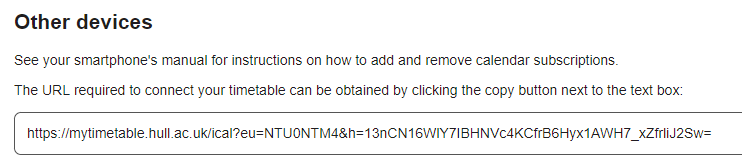
Just paste it into your calendar app, and you should be good to go.
On Google Calendar open it on a laptop:
- Click the settings cog, then Settings
- Add calendar
- From URL
- Copy and paste the link
- Wait a minute (the first sync takes longer than usual)
You should end up with something that resembles this:
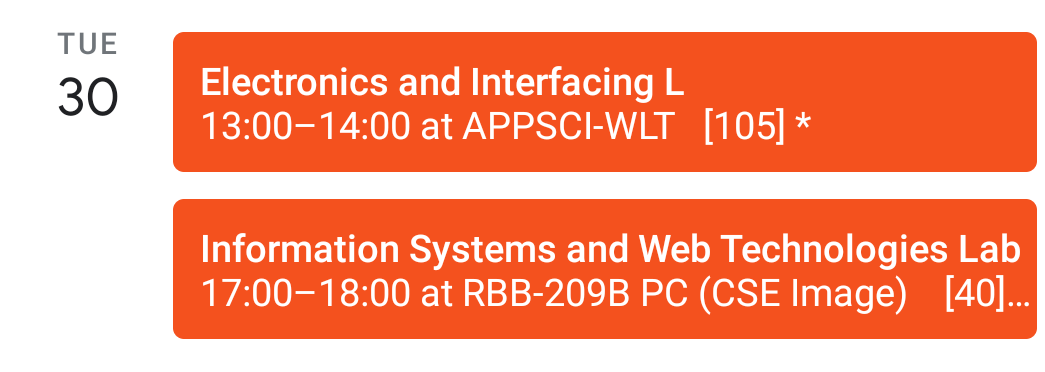
If it doesn’t show, remember to check “Show” in the Google Calendar menu.
Facebook also has iCal feeds for events, which societies use a lot. Canvas does too, but some modules spam the calendar, making it unusable. The rest of this tutorial is based on Google Calendar, so if you’re having trouble, just switch. You’ll then have a calendar that looks as good as this, plus it’s amazing for productivity once you sync everything up.
You can sync your uni email to your phone, which is very handy for people who forget to check their emails. I use Gmail, but any client should work.
- Go to settings and add account
- Select Exchange or Office 365
- Your email is actually your computer login with @hull.ac.uk (e.g., 554537@hull.ac.uk). The newer emails may just work as the actual email; these are from 2018 onwards with only @hull.ac.uk at the end.
- Your password is your computer login password.
- Allow admin rights (a bit worrying, yes, but oh well).
The server settings should get automatically picked up, but if you’re having trouble, here is my entire config:
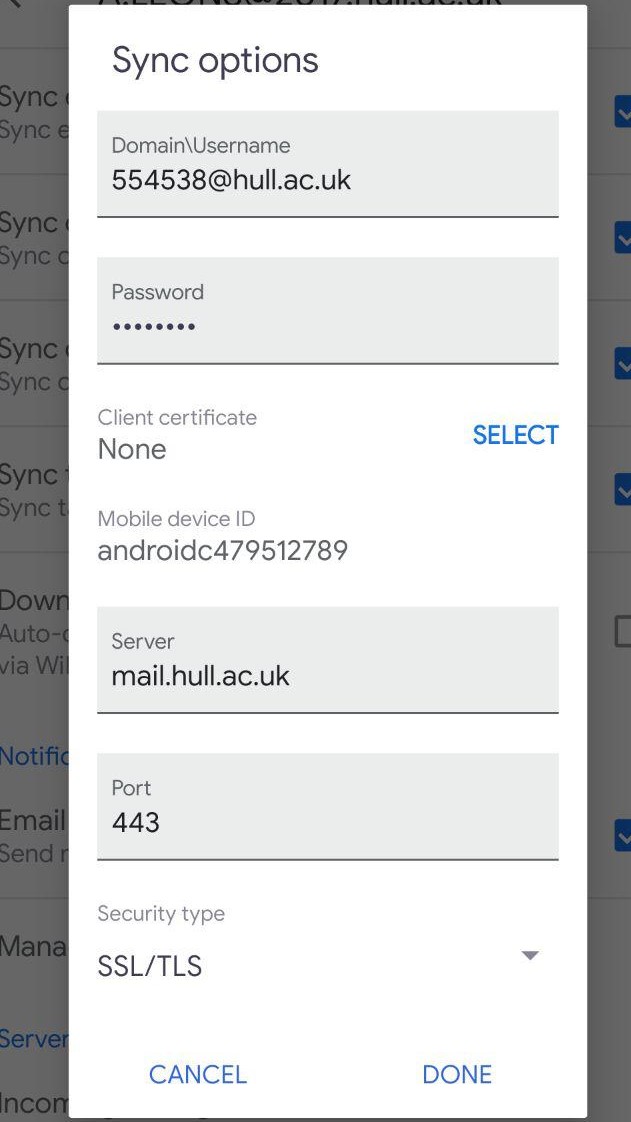 This also syncs your calendar events to Google Calendar if you have an Android phone.
Wi-Fi
The university says to get an installer from Eduroam CAT, and I support them. It works, but your mileage may vary. Just select Hull Uni and download the installer; the login is described in the process below. However, a PC connection is simple enough that you don’t need an installer:
- Connect to Eduroam, and it will prompt you for a username and password
- Your username is your computer login with @hull.ac.uk (e.g., 554537@hull.ac.uk)
- Your password is your computer login password
Fun fact: Eduroam works on campuses across 101 countries; I found this out when I was in Dublin. To connect all your other devices, you use the same login, but you’ll probably have to go into advanced connection settings. If you get less than 20 Mb/s, cry! You can test your speed here.
Note: if you use a custom DNS, Eduroam will not work; this is probably because they want to track your activity.
Software
Students can get Office for free here. And all other software is available here. You use your university email and password to log in, but IT is a bit slow, so it may take a few weeks to activate.
Get your files
This is the most complicated one: the university has Box for cloud storage, but they do not have Box Sync installed, so it’s basically useless.
They do provide a VPN so you can access your drives as if you’re at uni; you can read more about it here. Download the installer and log in with your credentials. If you’re on Eduroam, you just need to map your drives, and it will just work. You can find how to do that here.
Random
I think I’ve covered everything. Two more unrelated things I would recommend: Monzo, the app-only bank, which you can read about here and sign up for here. Splitting bills and creating a tab for your house are extremely useful for students; my friends and I already have a tab set up, and we haven’t even moved in yet.
If you’re a computer scientist, get the GitHub Student Developer Pack here. It’s so much better than SVN! It even does static web hosting for free, so I recommend making a website. Here’s a little secret: my entire site costs £10 a year to run and helped me land an internship, so I’d say it’s a good investment. You can read more about that here.